




CS2 system requirements look simple at first glance, but the real question is not “Will it launch?” It is “Will it stay smooth when the round gets messy?” Will your frames drop when that smoke pops or when you get into a dual with someone?
On pley.gg, we use Valve’s minimum requirements as the baseline, then add practical recommended specs so you can aim for stable performance, not just a loading screen.
CS2 system requirements: At a glance
Valve only publishes minimum requirements on the Steam page, so the recommended specs below are practical targets for smoother play, not an official Valve label.
| Component | Minimum requirements (official) | Recommended specs (smooth competitive 1080p) |
|---|---|---|
| OS | Windows 10 | Windows 10/11 (64-bit) |
| CPU | 4 hardware CPU threads, Intel Core i5-750 or higher | Modern 6-core CPU or better |
| RAM | 8 GB | 16 GB |
| GPU | 1 GB+, DirectX 11 compatible, Shader Model 5.0 | Midrange GPU with 6 GB+ VRAM class |
| Graphics API | DirectX 11 | DirectX 11 with recent drivers |
| Storage | 85 GB available | SSD recommended |
Minimum requirements vs recommended specs
Minimum requirements are the “can it run” line. Recommended specs are the “does it feel good” line.
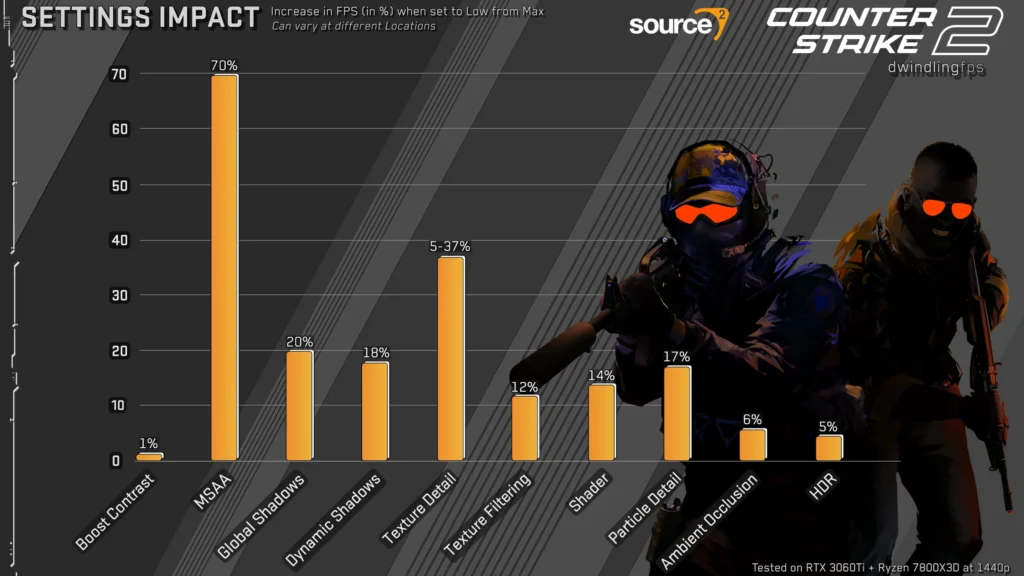
If you are close to the minimum requirements, CS2 will often run, but it can struggle in the exact moments that matter: executes, retakes, and full utility fights. That is why CS2 system requirements are worth reading like a competitive player, not like a checklist. Sure, most professional player setups focus on the “lower-end” of settings, but that just means stability, not the best they can do.
Credit: Reddit
Here is what typically improves when you move from minimum requirements to a more realistic setup:
You get fewer sudden dips, better consistency, and fewer stutters that ruin aim fights.
It is also why “average FPS” can be misleading. You can have a decent average and still get ugly drops at the worst possible time. The goal with CS2 system requirements is stable frame times, not just a pretty number.
CS2 system requirements: SteamOS and Linux
Valve lists “SteamOS + Linux” minimum requirements on the CS2 Steam page, and they are not identical to Windows because Vulkan support and driver quality matter more here. Moreover, it’s vital that you understand that the game will run best on Windows, as this is it’s native OS, but that doesn’t mean it will run inherently bad on other OSs’. Should this mean that you cannot rank up on your Linux setup? Absolutely not! It just means that you should not expect the same level of performance on Linux as you would on Windows.
SteamOS minimum requirements
This is the readable “what you need” version for SteamOS users, based on Valve’s published SteamOS + Linux minimum requirements.
| Component | SteamOS minimum requirements |
|---|---|
| OS | SteamOS (Listed under SteamOS + Linux) |
| CPU | 4 hardware CPU threads, Intel Core i5-750 or higher |
| RAM | 8 GB |
| GPU | AMD GCN+ or NVIDIA Kepler+ with up-to-date Vulkan drivers |
| Vulkan note | VK_EXT_graphics_pipeline_library support is highly recommended |
| Storage | 85 GB available space |
| Sound | Highly recommended |
If you meet the minimum requirements on SteamOS but performance still feels rough, your Vulkan driver stack is often the deciding factor, not the “8 GB RAM” line.
Linux minimum requirements
Valve references Ubuntu 20.04 on the Steam page for the Linux minimum requirements. Other distros can work, but this is the baseline Valve points to.
| Component | Linux minimum requirements |
|---|---|
| OS | Ubuntu 20.04 |
| CPU | 4 hardware CPU threads, Intel Core i5-750 or higher |
| RAM | 8 GB |
| GPU | AMD GCN+ or NVIDIA Kepler+ with up-to-date Vulkan drivers |
| Vulkan note | VK_EXT_graphics_pipeline_library support is highly recommended |
| Storage | 85 GB available space |
| Sound | Highly recommended |
If you are right on the minimum requirements, expect to spend more time tuning than playing on default settings. That goes double on Linux if drivers are outdated.
What about macOS?
CS2 is not supported on macOS. Valve ended support around the CS2 launch window, alongside dropping older support targets like 32-bit operating systems.

Credit: Reddit
If you are a macOS player, the practical options are streaming, dual-boot setups on supported hardware, or playing on a different system. For most readers, the key point is simple: CS2 system requirements do not include macOS because CS2 is not available there.
CS2 system requirements: What you need for 144 Hz and a competitive feel
A lot of people read CS2 system requirements and assume “recommended” means “high settings.” In Counter-Strike, recommended usually means “stable.” Just look at some of the best CS2 players out there and how they approach this and you will understand why having the “highest” settings in-game means very little.
Use this as a practical way to think about targets:
If you play on a 144 Hz monitor, you want headroom so your FPS does not collapse during the exact rounds you remember for the wrong reasons. For 240 Hz players, CPU performance and overall system responsiveness matter even more, because the game is often CPU-limited in competitive settings.
This is why the recommended specs column above leans toward a modern CPU and 16 GB RAM. It is not glamorous, but it is the difference between “fine in warmup” and “why did my spray feel delayed.”
Upgrade priorities for CS2
If you are trying to improve performance without wasting money, treat CS2 system requirements like a prioritization problem:
Start with the CPU if you are chasing stability, then go to 16 GB RAM if you are still on 8 GB, then look at the GPU if you are clearly graphics-limited, and finally move to an SSD if you are still on an HDD for general smoothness and faster loads. With Season 4 already in motion, Valve aims to optimize many different aspects of the game. However, you should not expect the criteria for requirements to drop.
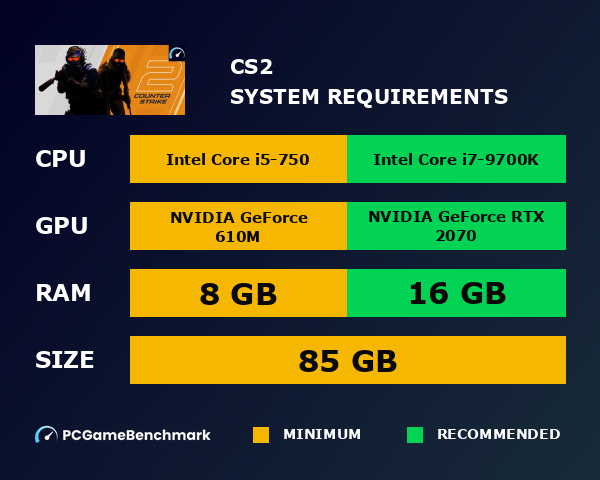
The cheapest upgrade that often improves day-to-day smoothness is jumping from 8 GB to 16 GB RAM, especially if you multitask while playing.
How to check your specs fast
You can check whether you meet the minimum requirements in under a minute:
On Windows, open Task Manager, go to the Performance tab, and read CPU, Memory, GPU, and Disk. If you want to confirm your DirectX version, type “dxdiag” in the Windows search and open it.
Then compare what you see to the CS2 system requirements table above. For Linux and SteamOS, the important comparison is still CPU threads, RAM, storage, and especially whether your GPU and Vulkan drivers match the requirement notes Valve lists.
Quick performance fixes if you meet the minimum requirements but it runs badly
If you meet the minimum requirements and CS2 still feels rough, fix the obvious stuff first before buying hardware:
This YouTube guide shows exactly what settings you should focus on to gain the most out of the game while helping out your performance in the meantime.
Lower resolution or use a more performance-friendly resolution, reduce the settings that hit visibility the least (shadows and effects are common culprits), close heavy background apps and overlays, update GPU drivers, and reboot after driver updates.
If lowering graphics barely changes performance, you are likely CPU-limited, which means buying a stronger GPU will not automatically solve the problem.
CS2 system requirements are clear for minimum requirements, but competitive play demands more than “it launches.” Treat the minimum requirements as the entry ticket, then aim for the recommended specs if you want fewer stutters, fewer dips, and a smoother feel in real rounds.
