







Welcome here. If you’ve ever looked at your CS2 inventory and thought, “That’s a rent payment sitting in my skins,” this guide is for you.
In 2025, it’s easier than ever to sell CS2 skins for real money, but there are still traps: fake bots, sketchy “instant” CS2 cashout offers, holds on Steam, and platforms that pay pennies on the dollar. If you rush it, you risk losing both the skin and the cash.
This article walks you through how to sell CS2 skins safely step by step:
- What to check in your Steam and CS2 accounts before trading
- How external marketplaces work
- How a real money CS2 trade usually looks from start to finish
- What to expect from payouts, verification, and transaction status
As a working example, we’ll use white.market – a CS2 skins marketplace focused on real-money trades and fast cashouts. It’s one of the contenders for best site to sell CS2 skins if you want a mix of speed, fair prices, and low friction, not some random “bot with a logo”.
By the end, you’ll know:
- How to sell CS2 skins for real money without guessing
- How to sell CS2 skins instantly when you need fast cash
- What matters more: highest price vs fastest payout
We start from the basics: getting your Steam and CS2 account ready so trades don’t get stuck in limbo.
Preparing Your Steam and CS2 Account
Before you list anything on a CS2 skins marketplace, your Steam setup has to be clean. Most problems with a real money CS2 trade come not from the site, but from Steam settings, trade locks, or security rules.
Go through this checklist first.
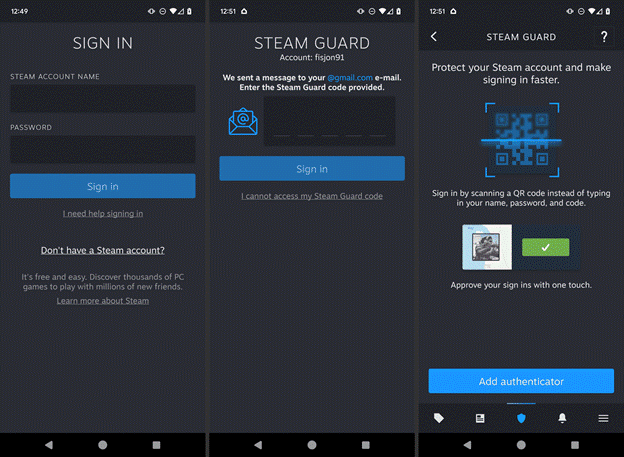
1. Turn on Steam Guard and Confirmed Email
Steam wants your account to look safe before it lets you trade freely.
Do this:
- Open Steam – Settings – Account.
- Turn on Steam Guard (mobile app preferred).
- Make sure your email is verified and active.
If Steam Guard was just activated, new devices or recent password changes may trigger trade restrictions for a few days. Better to fix this now than when you try to sell CS2 skins instantly and see a red warning.
2. Check Trade Ban and Community Ban
If Steam suspects fraud, chargebacks, or other issues, it can limit trades.
- Go to your Steam profile.
- Look for any warning text about trade bans or community bans.
- If anything shows up, no external marketplace will be able to pull your items until it’s cleared.
No marketplace can bypass a Steam trade ban. If you want to sell CS2 skins for real money, your account has to be in good standing.
3. Set Your Inventory to Public
External sites need to read your inventory through the Steam API.
- In Steam, go to Profile – Edit Profile – Privacy Settings.
- Set Inventory visibility to Public.
- Keep Profile public as well, at least while you trade.
You can switch back to private later, but during the CS2 cashout process, inventory must be visible.
4. Remove Trade Holds Where Possible
Steam applies trade holds in several situations:
- You just added a new device.
- You changed password or Steam Guard settings.
- You’re not using the Steam Mobile Authenticator.
General rule of thumb:
- With authenticator active for 7+ days – trades are fast.
- Without it – trades can be delayed by up to 15 days.
If you plan a big real money CS2 trade, activate the mobile app, wait until all temporary holds expire, then proceed. That way you don’t wait half a month for a payout just because Steam is holding the items.
5. Launch CS2 and Refresh Your Inventory
Sometimes items don’t show correctly on third-party platforms if you haven’t launched the game in a while.
- Start CS2.
- Let it fully load.
- Open your inventory in-game once.
This helps sync recent drops, cases, or purchased skins across Steam and external services. If you want to sell CS2 skins instantly, you don’t want any “ghost items” that exist only in your head and not in the API.
6. Secure Your Account Before Big Trades
You are about to move digital items that can be worth more than a gaming PC. Treat your account like online banking.
Basic security steps:
- Use a strong, unique password for Steam.
- Don’t share login details with “helpers” or random Discord traders.
- Don’t accept “verification trades” from unknown bots.
You don’t need to be paranoid, just not careless. Platforms like white.market will never need your Steam password. They trade through Steam offers, not direct login.
Once this prep is done, your account is ready. Next step: plan what exactly you want to sell, how much you expect to get, and what kind of CS2 cashout speed you need.
Preparing to Sell CS2 Skins for Real Money
Steam is ready. Now decide what you’re selling and how you want to cash out.
Check Real Prices
Don’t eyeball it.
- Look at Steam Community Market to see a reference.
- Compare with 1–2 external sites.
- Note float, stickers, rare patterns on high-value skins.
Have a realistic price range in mind before you see any offer.
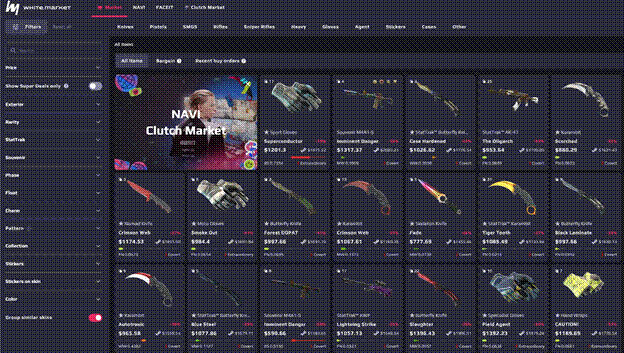
Pick Marketplace Type
Main options to sell CS2 skins for real money:
- P2P listing (such as white.market) – closer to market price, slower.
- Instant sale / bot buying – lower price, fast CS2 cashout.
- Random Discord traders – highest scam risk, skip it, especially if you’re new.
Check Fees and Limits
Before trading, look at:
- Seller fee
- Extra payout fees
- Minimum withdrawal amount
This keeps you from “selling high” and then losing a chunk on withdrawal.
Now you know what to sell, where, and how you want to get paid. Next step: actual trading flow on an external marketplace, using white.market as the main example.


Step-by-Step: How to Sell CS2 Skins Through an External Marketplace
External markets are where the real money sits. Let’s walk through how to sell CS2 skins using white.market as a working example of a CS2 skins marketplace.
White.market is P2P: real users trade with each other, with 0% fee on deposits and withdrawals, and a 5% seller fee. You keep your items in your own inventory until the deal is done, which is a big plus for anyone doing a real money CS2 trade.
You can trade CS2 skins of all ranges here – from “under $5 fillers” to knives and gloves with big Steam discounts.
Registering on the Platform

- Go to white.market. Open the site in your browser or use the mobile app / Chrome extension.
- Log in via Steam. Click Log in with Steam. Confirm through Steam OpenID. No passwords shared with white.market – it’s just a Steam sign-in.
- Confirm email. Add and verify your email inside your white.market profile. This will be used for security alerts and trade updates.
White.market is part of the WhiteBIT ecosystem (one of the largest European crypto exchanges), so the account system is built with that stack in mind. If you’re looking for a stable, long-term base and not a random “fast cash” site, this matters when picking the best site to sell CS2 skins.
Connecting Your Inventory and Checking Your Skins
Next step: connect your Steam items so the marketplace can see them.
Add your Steam Trade URL
- Grab it from Steam (Inventory – Trade Offers – Who can send me Trade Offers?).
- Paste it into your white.market profile.
Check privacy and API
- Make sure your inventory is Public in Steam settings.
- CS2 items must be visible; otherwise they won’t load on the site.
Open the inventory tab on white.market
- Switch game filter to CS2.
- You’ll see your skins with wear, float, and current suggested price.
Here you can quickly spot which items are cheap fillers and which ones are real value. If you’ve got things like Butterfly | Slaughter, M4A1-S | Blue Phosphor or rare stickers, you’ll see they sit in a different price range right away.
Selecting Skins for Sale
Now pick what you actually want to turn into cash.
Typical flow:
Filter by price or type
- Sort by highest price first to see knives, gloves, and high-end rifles
- Or filter by “under $5 / $50 / $100” brackets to clean mid-tier stock.
Mark items for sale
- Tick the checkboxes next to skins you want to list.
- You can select one item or a whole batch.
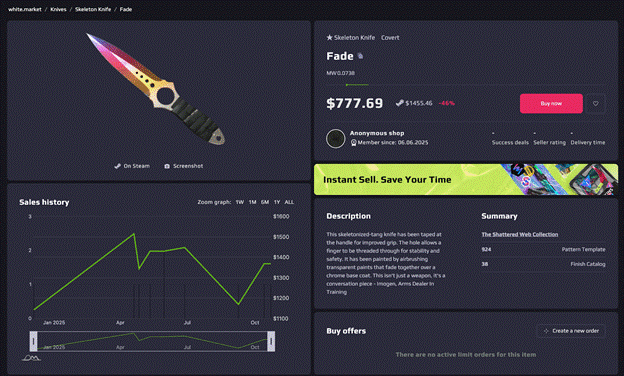
Double-check details
- Look at float, stickers, and condition (FN, MW, FT, etc.).
- For high-value items, confirm you’re listing the correct pattern.
If you want a quick CS2 cashout, you might list more items with aggressive prices. If you want to sell CS2 skins for real money but keep your main play loadout, just move the extras.
Setting the Price (If the Platform Supports It)
This is where you decide between “fast sale” and “max value”.
White.market supports limit orders, which is strong for sellers. Choose your strategy per item. Want to sell CS2 skins instantly? Set your price lower than similar listings to be picked up fast. Want better value? Match or slightly undercut average listings and wait.
Then, create your listing / shop
Confirm your prices and list.
If you’re a more active trader, you can create a custom shop page and share it with friends or followers.
Each listed item now waits for a buyer. Once someone locks in the trade, you’ll get a Steam offer and, after confirmation, money lands in your white.market balance – ready for real money CS2 trade cashout in fiat or crypto.
Next step: how to confirm the Steam trade itself so you don’t lose skins or delay payout.
Confirming the Trade Through Steam
When a buyer picks your offer on white.market, the deal moves into Steam. This is the only moment your skin actually leaves your inventory, so don’t click through mindlessly.
Basic safe flow:
1) Wait for the correct trade offer
You’ll see a notification in Steam and/or on your phone. Sender should be the official white.market trade account shown in the order, not some random profile from DM.
2) Open the offer and check items
- Outgoing item list = exactly the skins you listed.
- Incoming side = usually empty (P2P escrow model), because money goes through white.market balance, not through Steam items.
- Check there are no extra items you didn’t mean to send.
3) Confirm with Steam Guard Mobile
Open the Steam app – Confirmations.
Approve the trade with the correct trade ID.
4) Verify on white.market
After Steam confirms, the order status on white.market should move to “completed” (or similar) and your balance updates.
If anything looks off – wrong account, wrong items, weird extra skins – decline the offer and check the order page on white.market before trying again.
Receiving Your Payout: Withdrawal Methods
You’ve sold the skins, the trade is confirmed, and money is on your white.market balance. Now you finish the CS2 cashout and turn that digital value into real money.
white.market is built for real money CS2 trade with two main payout rails:
- Fiat – bank cards and local currencies
- Crypto – USDT, BTC, ETH, WBT and more via wallets or WhiteBIT Codes
And the nice part: 0% fee on deposits and withdrawals with WhiteBIT Codes*, plus low friction inside the WhiteBIT ecosystem.
Choosing a Withdrawal Method
In the payout section, you pick where the money will land:
Bank card / fiat
Withdraw to your card in supported currencies (EUR, USD, and other locals). Good if you just want “cash for life stuff” with no crypto involved.
Crypto wallet
Withdraw in USDT, BTC, ETH, WBT and other supported coins. Good for fast global cashouts and for traders who already live in crypto.
WhiteBIT Codes + WhiteBIT exchange / Nova card
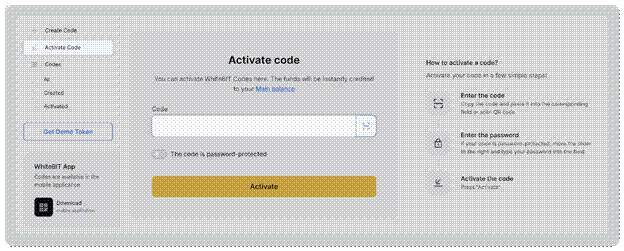
- Create or redeem WhiteBIT Codes for 0% deposit and withdrawal fee on white.market.
- Use WhiteBIT itself or the WhiteBIT Nova card to spend, convert, or hold funds.
- Higher Nova deposits even unlock different card “skins” – GLHF, Full Buy, Holo Chicken.
Pick what you already use in your daily life. For most players, it’s either bank card or basic USDT/BTC withdrawals.
Entering Payment Details
Once you pick the method, fill in the details carefully:
For bank card / fiat
- Specify card or account details as requested.
- Double-check card number and currency to avoid failed payouts.
For crypto
- Paste your wallet address.
- Pick the correct network and coin (e.g., USDT on the right chain).
- Triple-check the address – crypto sends can’t be reversed.
For WhiteBIT Codes
- You can redeem a code inside your white.market/WhiteBIT flow or create one to move funds.
- It’s a fast way to move money between white.market and WhiteBIT with 0% fee on that leg.
Save the payout method you plan to use often so next sell CS2 skins for real money cycle is quicker.
Minimum Withdrawal Amount
Minimums depend on the method and currency, but the logic is simple:
- WhiteBIT Codes – very low barrier; you can move any amount above 0.01 USDT via codes.
- Bank cards / direct fiat – usually have higher minimums because of banking rules and processing costs.
- Crypto withdrawals – each coin has its own minimum and network fee.
If you trade small skins, it’s often better to stack a few sales on your white.market balance, and withdraw once when you pass the comfortable minimum for your method. That way you don’t waste time on micro cashouts.
Processing Times
How long it takes to see money depends on what you picked:
WhiteBIT Codes – WhiteBIT / Nova card
Usually near-instant transfer between services. Good when you want a very fast CS2 cashout into crypto or a spendable card.
Crypto withdrawals to your own wallet
Depends on blockchain network load. Often minutes to tens of minutes.
Bank card / fiat payouts
Typically longer: can range from near real-time to a couple of business days, depending on bank and region.
white.market processes the withdrawal on its side, then the payment network takes over. If it’s taking longer than expected, the first place to look is your bank or the blockchain explorer, not the trade itself – your skins are already sold, the money just travels through the payout rails.
Identity Verification (KYC) If Required
Most small and mid-size cashouts on white.market go through with basic checks only. For larger sums, higher limits, or specific payout methods, the platform can ask you to pass KYC through the WhiteBIT ecosystem. It’s a standard ID and basic data check used to keep fraud and stolen skins off the market.
If you ever see a prompt to verify, treat it like a one-time step: send the requested documents, wait for review, then trade and withdraw with higher limits and fewer restrictions. For anyone who plans to sell CS2 skins for real money regularly, doing KYC early usually makes life easier.
Checking the Status of Your Transaction
After you list skins, confirm the Steam trade, and request withdrawal, everything can be tracked inside your white.market account. You can see whether an order is still waiting for a buyer, already sold, or cancelled, and whether a payout is pending, processing, or completed.
Each stage of the real money CS2 trade is reflected there: from “trade offer sent” and “trade completed” to “withdrawal created” and “funds sent.” If something feels stuck, the first move is always to open your orders and withdrawals page, match the status with your Steam trade history or wallet, and only then decide if you need to contact support.
Conclusion
Selling CS2 skins for real money in 2025 is not rocket science: secure your Steam, pick a trusted CS2 skins marketplace, list smart, confirm trades carefully, and withdraw in a way that fits your life. Once you understand how to sell CS2 skins step by step, the whole process starts to feel like normal trading, not gambling with your inventory.
If you want a mix of real users, P2P safety, fiat and crypto payouts, and low friction on deposits and withdrawals, white.market is a strong pick for the best site to sell CS2 skins and turn pixels into actual cash.


