


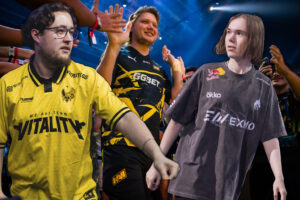

Every time there’s a big CS2 result, someone in chat asks for the winning player’s settings. This week it was 100 Thieves, after dev1ce and gla1ve beat their old team Astralis in a match that could decide who gets a Major invite.
I get the impulse. One player’s config tells you very little on its own, though, so I went looking at the whole professional scene instead.
The Data
The most complete source I’ve found is csdb.gg, an independent database of CS2 pro settings that covers 1,011 players. It holds full sensitivity data for 1,007 of them, along with resolution, crosshair codes, mice and monitors, and its last full sweep of settings ran on September 21.
What I like about it is that every player page shows when that player’s settings were last changed. A lot of config sites are quietly two years out of date, and in CS2 that’s long enough for someone to have swapped mouse, resolution and sensitivity twice over.
The data has its limits, of course. Hardware fields are less complete than the sensitivity ones, and it’s a snapshot of what players use right now rather than a history of how they got there.
With a sample that size, you can actually see where the pro scene agrees with itself and where it doesn’t.
Sensitivity Is Remarkably Consistent
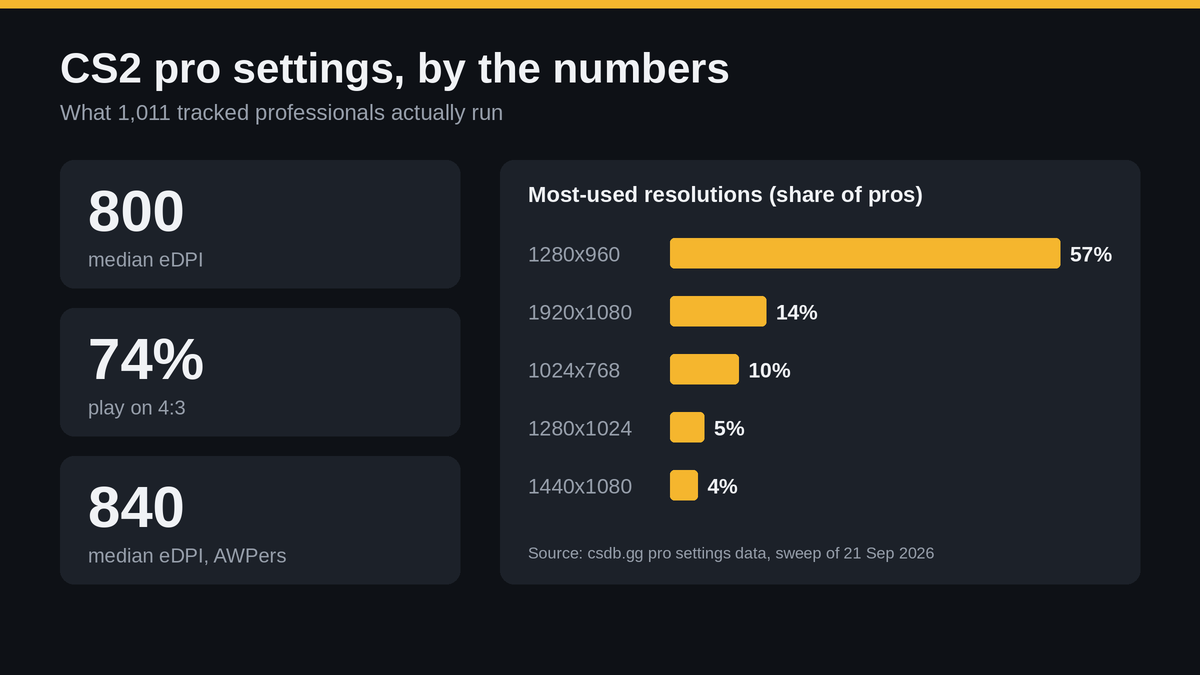
The number to look at is eDPI, which is simply mouse DPI multiplied by in-game sensitivity. The median across all tracked pros is 800 and the mean is 850, so think 400 DPI at 2.0 or 800 DPI at 1.0.
Riflers and IGLs sit on exactly the same median of 800. AWPers are the only group that moves, with a median of 840 and a mean of 921, and that makes sense to me, because snapping between scoped angles is the one job in CS where a bit more speed really pays off.
To work out yours, grab the DPI from your mouse software and the sensitivity from the game’s settings, then multiply the two. It takes about thirty seconds and it’s the most useful number in this whole article.
If you’re sitting at 1,600 eDPI because it feels fast, I’d gently point out that almost nobody at the top level agrees with you. Come down in steps of about 10% rather than halving it overnight, or your aim will be all over the place for a week.

Stretched 4:3 Still Rules
74% of tracked pros play on a 4:3 aspect ratio. Only 16% use native 16:9.
The most popular resolution by a distance is 1280×960, used by 575 players, or 57% of the dataset. 1920×1080 is next on 14%, and 1024×768 still has 10%, which surprised me more than anything else in the numbers.
That last one is a resolution plenty of veterans grew up on, and some of them have simply never seen a reason to move.
The case for stretched is simple: models look wider and easier to hit, at the cost of some horizontal vision. I wouldn’t force it on yourself, though, because the pros on native 1080p include some very good players, and this is one setting where comfort beats copying.
One recent change helps here. Valve’s latest update made crosshairs keep the same physical size whatever resolution you use, so a pro’s crosshair code now looks the same on your screen whether you play stretched or native.
The Gear
Monitors are close to a monopoly. The ZOWIE XL2566K is used by 257 pros and the XL2546K by 255, and ZOWIE holds all of the top eight spots.
That makes more sense when you remember that ZOWIE screens are the standard at a lot of big tournaments, so pros tend to practise on the same model they’ll play on under the lights.
Mice are more of a two-horse race between Logitech and Razer. The black G Pro X Superlight 2 leads with 88 players and the G Pro X2 SUPERSTRIKE has 77, with Razer’s Viper V3 Pro and DeathAdder V4 Pro not far behind.
For headsets and mousepads, the HyperX Cloud II and SteelSeries QcK Heavy come out on top. I wouldn’t read too much into gear, since a fair bit of it comes down to sponsorship, but the lean towards light mice and 24.5 inch monitors is worth knowing if you’re shopping.
Where I’d Start
If I were setting up CS2 from scratch tomorrow, I’d go with an eDPI around 800, try 1280×960 for a week, and pick a plain crosshair I could see on every map. Then I’d leave it all alone for a good while.
That last part is the hard bit. Most players change something after one bad game, which quietly undoes whatever progress their aim was making.
For the crosshair, I’d borrow a code from a player whose style I like rather than building one from nothing. The csdb player pages list them next to everything else, so it’s one less thing to guess.
Settings only get you so far anyway. If you want to keep improving before the Major, our CS2 guides go deeper on maps, utility and movement.
