






If you are serious about climbing the ranks in VALORANT, relying solely on the basic in-game Career tab is not going to cut it. While the default client shows your basic match history, it leaves out crucial performance metrics that reveal why you are winning or losing your gunfights.
To truly understand your strengths and weaknesses, you need to utilize a third-party stat tracker. Here is everything you need to know about how VALORANT stat trackers work, which metrics you should be watching, and how to use tools like Tracker.gg to improve your game.
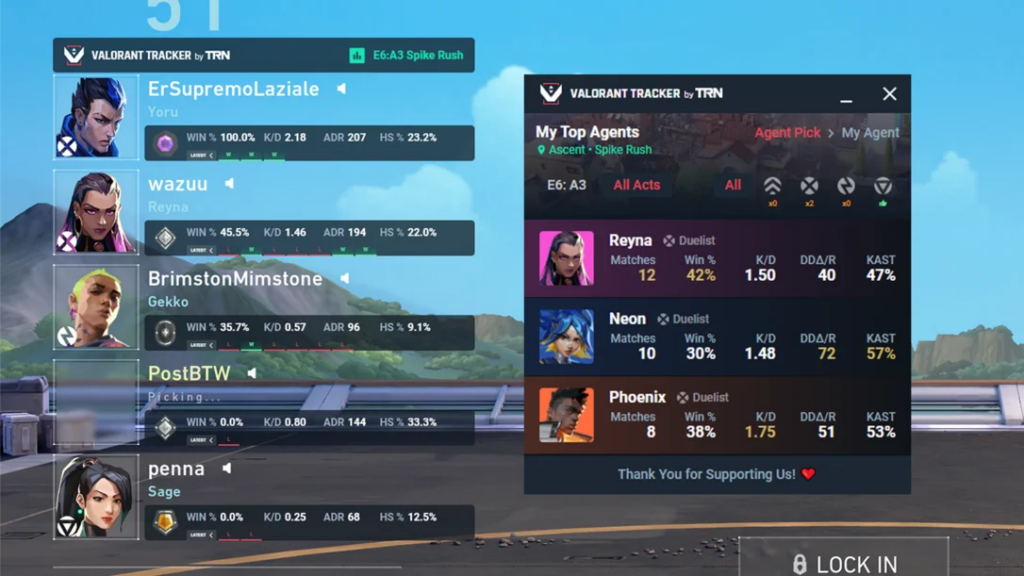
What is a VALORANT stat tracker?
A VALORANT stat tracker is an external tool or website that connects directly to Riot Games’ official API. These platforms aggregate data from every single match you play, converting raw game numbers into actionable insights, graphs, and long-term trends.
Instead of just showing whether you won or lost, a tracker breaks down:
- Detailed Damage Output: Your Average Damage per Round (ADR).
- Precision Metrics: Your Headshot, Bodyshot, and Legshot percentages across different weapon types.
- Agent & Map Performance: Your exact win rate with specific agents on specific maps.
- Clutch Consistency: How often you win 1v1, 1v2, or 1v3 situations.
The key stats you should be watching
When analyzing your stats, it is easy to get hyper-focused on your K/D ratio. However, K/D can often be deceiving. Here are the core stats that higher-ranked players and coaches actually look at:
1. Average Damage per Round (ADR)
ADR measures how much impact you have in every round, regardless of whether you land the final blow. An ADR of 140 or higher generally indicates that you are contributing solid value to your team’s teamfights.
2. First Kills vs. First Deaths (FK/FD Ratio)
If you play Entry Duelists like Jett or Raze, this is your most important metric. Opening up a site with an initial kill gives your team an overwhelming statistical advantage to win the round. Conversely, dying first without trading puts your team on the backfoot.
3. Map & Agent Win Rates
Many players assume they are “bad at the game” during a loss streak, when in reality they might just be picking the wrong agent for a specific map. Stat trackers allow you to filter your performance by map, helping you spot hidden trends (e.g., realizing you have a 65% win rate on Sunset with Cypher, but only a 35% win rate on the same map with Reyna).
How to use Tracker.gg to analyze your gameplay
Tracker.gg is currently the most popular third-party tracker in the community. Getting started takes less than a minute:
- Make Your Profile Public: Log into the site using your official Riot Games credentials. This authorizes the tracker to pull your match data.
- Search Your Profile: Type in your Riot ID and tagline (e.g.,
Player#1234) into the search bar. - Analyze Your Performance:
- Use the Overview tab to see your current rank progression, top agents, and recent performance trends.
- Check the Matches tab for detailed round-by-round breakdowns, including where kills occurred on the map grid.
- Optional Desktop Overlay: You can download the Tracker.gg desktop app (powered by Overwolf) to see real-time player stats and peak ranks directly on your screen during match loading screens.
Are third-party stat trackers safe?
Yes, absolutely. Tools like Tracker.gg use Riot’s official, publicly available API endpoints. They operate strictly within Riot Games’ developer guidelines and do not modify game files or inject code into the client.
Using an official API tracker will never trigger a Vanguard anti-cheat ban, as long as you are using trusted, established platforms.
