



The latest Counter-Strike 2 update has wiped all existing player crosshairs, requiring the entire player base to reconfigure their reticles from scratch inside a redesigned settings menu.
New crosshair scopes menu and resolution scaling
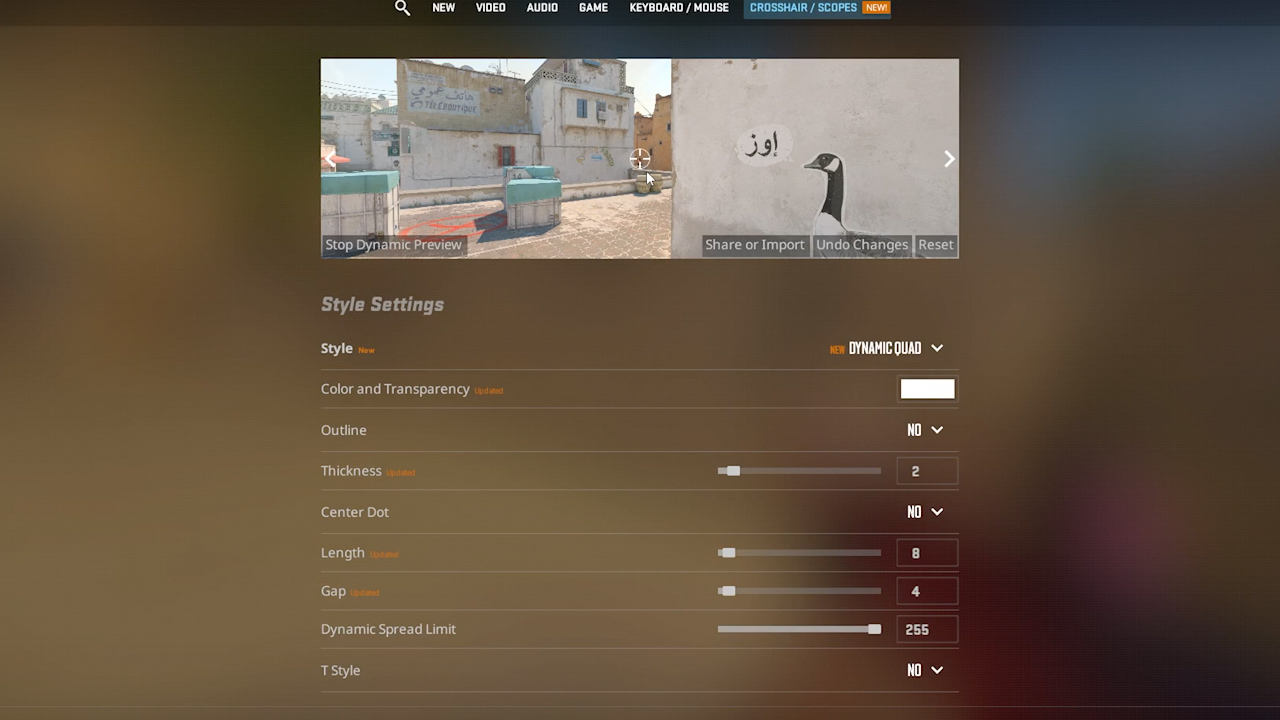
Valve has replaced the legacy reticle options with a dedicated “crosshair scopes” tab. The menu introduces several non-traditional geometry presets, including stack circle, classic dot, dynamic cross, dynamic circle, and dynamic quad. For dynamic variations, players can toggle dynamic movement off directly through a dedicated stop setting. Standard modification sliders for thickness, length, and gap remain available.
The most substantial technical adjustment is resolution independence. Previously, crosshair pixel scaling shifted whenever a player changed display settings, creating inconsistencies between 4:3 stretched and native 16:9 resolutions. Crosshairs now maintain identical physical dimensions regardless of the chosen resolution or aspect ratio.
The menu also includes practical testing tools. Players can preview reticles against selectable map backgrounds and against a player model to verify visibility and color contrast. Dedicated adjustment panels for grenade lineup crosshairs and sniper sights are located beneath the primary reticle settings.
Pro player codes and conversion tools
Many players are looking to immediately reapply professional player settings. Several legacy share codes currently encounter import errors within the updated client, though they remain the baseline references:
- donk: CSGO-buKKq-vuN2y-N2qhj-OtbcN-OttyM
- ZywOo: CSGO-VnL3Q-QMJ5u-xb7aC-8ULUb-XCJ8D
- ropz: CSGO-FTLwe-THVF6-D3YAt-3tYYA-ARrhH
- molodoy: CSGO-XqTfM-BMwPO-9hrDM-K3BPP-547yD
- XANTARES: CSGO-DQmkX-ef9jj-zrq4b-LOvqS-SizbE
If an import code fails to load through the interface, you can manually apply core values through the developer console. For example, donk’s crosshair can be set using the following console commands:
cl_crosshair_length 2
cl_crosshair_gap 0
cl_crosshair_thickness 2
For those wanting to restore their exact previous configurations without rebuilding them manually, a third-party migration tool developed by horizzon1 converts older share codes to match the revised format: https://horizzon1.github.io/cs2-crosshair-migrator/

Community and novelty crosshair codes
The new geometry options have also resulted in several custom novelty crosshairs circulating among community players and content creators:
- Content creator light ring: CSGO-Ba9sx-H69TY-2rn2k-vEFhH-PGxzF
- Mini pinky donut: CSGO-WsqrG-cKWjC-OxDVm-MZjyr-YyMXL
- HALO crosshair: CSGO-7vtKd-xOHJ2-ryzBS-x76f7-dqhOQ
- Mini Waffle: CSGO-Ptcyf-jsBGH-deSGN-kzM9c-h5dRF
- Pharmacy Cross: CSGO-B2Y6j-zWdsK-OnC7K-kodOh-mYMoD
- Overwatch style: CSGO-NYMGK-e9FVz-n6Rcx-JfJd3-qBWrC
These profiles can be pasted directly into the share code import box inside the new crosshair scopes menu.
